

 iOS · Android · Web
Fintech · Shared banking
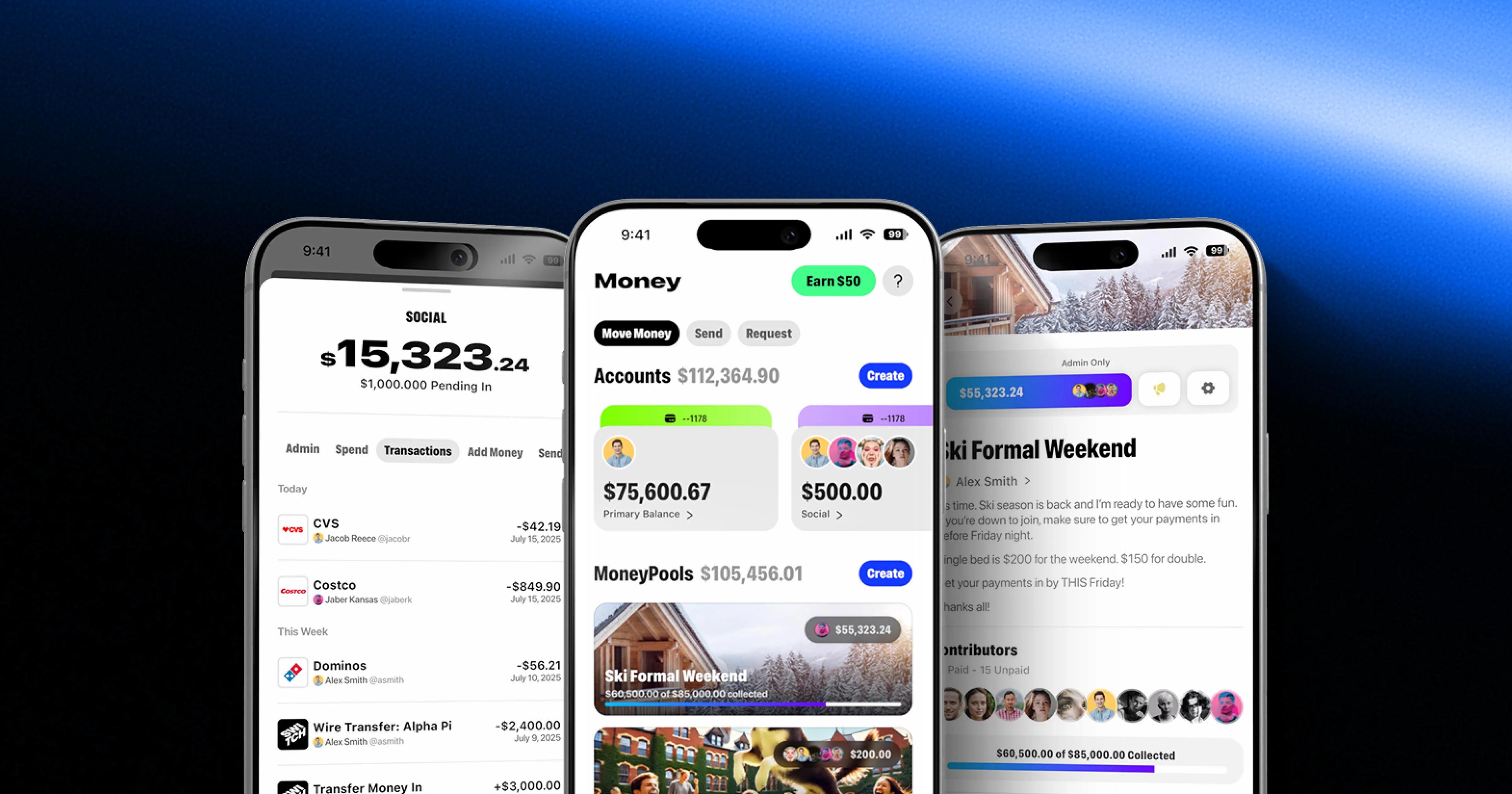
Switch: shared banking for clubs, teams and friends
4.7★App Store rating
End-to-end product design: research, UX flows, interface design, design systems and clickable prototypes, built to be engineered.
 What you get
User interviews, a review of analytics and support tickets, and competitor audits, boiled down to the few problems worth designing for first.
Journeys and wireframes for every key task, including the empty, error and loading states that templates skip.
High-fidelity screens for web and mobile, in light and dark themes where the product needs both, checked for contrast and touch-target size.
Reusable components, tokens and documentation, mirrored in Storybook so design and code use the same names and values.
Clickable flows for user testing, stakeholder sign-off and investor demos, built on the real design system rather than throwaway mockups.
Unmoderated tests in Maze and moderated sessions with real users, run on the prototype before engineering starts.
Understand users and goals.
Map journeys and wireframes.
UI and design system.
Prototype and test.
AI featuresAI output is sometimes wrong, so the interface has to make it easy to check and cheap to reverse. We design these four patterns into every AI feature by default.
Put the citation next to the answer, linked to the passage it came from, so a reader checks a claim in one click instead of taking it on trust.
Show which records and which people an AI action will change before it runs. A confirm step costs a second; a wrong bulk update costs a day of cleanup.
In Superdeal the agent drafts creator offers and messages, and the brand team reviews and approves each one. Nothing reaches a creator until a person sends it.
Keep a history of what the AI changed and a one-step undo. People try a feature they can reverse, and avoid one they can’t.
Our rule: any AI step that spends money or reaches a customer gets a review screen. AI agent guardrails
Stack by categoryIndustriesBuild or buySpend design effort where customers feel it, and reuse everywhere else.
| Your situation | Our recommendation |
|---|---|
| An internal tool or admin panel | Start from a UI kit |
| An early product that needs to prove demand | Clickable prototype first |
| A customer-facing product across web and mobile | Custom design system |
| An existing product where users drop off | UX audit, then a phased redesign |
Our recommendation: a custom design system only once several screens and teams depend on it.
Typical engagementResearch, key user flows and a clickable prototype you can test with users.
Full UI, design system and developer handoff, delivered alongside the engineering sprints.
An embedded product designer for new features, tests and design system upkeep.
Built by one in-house team, from discovery to launch and support. AI makes us fast; a senior engineer decides what goes live. Meet the team
What moves the price: the number of flows, platforms and screen states, and whether a design system already exists. Compare engagement models
Selected workiOS · Android · Web Web platformGuidesFAQ
Yes. Design-only engagements are common: we deliver the Figma files, design system and specs, hand off to your engineers, and review the built screens against the design.
Yes. A UX audit of analytics, support tickets and recorded sessions shows where people drop off. We fix the highest-impact flows first and redesign in phases, so the product keeps shipping.
Figma files with every screen and state, a documented design system with tokens, clickable prototypes and developer-ready specs. When we also build the product, the same components live in Storybook.
Most engagements start with a 2-week Discovery Sprint ($5,000 fixed fee, credited to your build), followed by a fixed-price build ($25k–$120k per project, 6–16 weeks) or a dedicated team (from $12k per month). The build price is fixed after discovery and billed in milestones tied to demoed features. Design-only projects follow the same model: research and a prototype in discovery, then a fixed quote for the flows and platforms agreed.
A clickable prototype of the key flows takes 2–3 weeks. The full UI and design system usually run alongside the first build sprints, so engineers start on approved screens while later flows are designed.
We design for uncertainty: show sources and confidence, make every AI action reviewable before it runs, and make it easy to correct or undo.
Figma for UI and design systems, FigJam for flows and workshops, Maze for unmoderated tests, Rive or Lottie for motion, and Storybook to keep design and code components in sync.
You do. Figma files, components and prototypes live in your workspace, and the design system is documented so your team can extend it without us.
Use an off-the-shelf UI kit for internal tools and early prototypes. Invest in a custom design system when the product is customer-facing, spans web and mobile, or several teams will build on it.
Yes. We hand off through Figma and Storybook, join your sprint planning, and review the built screens against the design before each release.
 Cookies, briefly
We use essential cookies to run the site and, with your OK, analytics and visitor identification. Privacy policy