

Xtime API integration for AI voice agents: a build guide
Xtime access is a partner program, not an API key. What it takes, what the scheduling API covers and what a voice agent has to build around it, from a shipped dealership build.

Xtime has no self-serve API keys. As of October 2026, Supergood’s assessment of the Xtime API lists six things before the first production call: an NDA, a partner agreement, setup and per-dealer fees, a Cox Automotive business review, a certified demo and an invitation code from each dealership.
We built AI voice agents for Innovative AI that book service appointments at US car dealerships through Xtime and run sales follow-up through VinSolutions, Cox Automotive’s dealership CRM. The agents are still live in production. On that build, the hard parts were matching a caller’s words to one service out of a long menu, checking slots and handling transport. Those, plus the access steps and our recommendations on safe retries, are what this guide covers, from the system side. If you want the finished product rather than the build notes, our custom AI voice agents page has the scope.
How do you get Xtime API access?
You get Xtime API access through Cox Automotive’s partner program, not by signing up for a key. Supergood, which grades vendor APIs, lists the steps as of October 2026: an NDA and a partner agreement, a setup fee plus annual and per-dealer fees, a business review by Cox, and a certified demo before production approval. After that, each dealership opts in with an invitation code.
The reference documentation is behind a login on the Cox Automotive Integration Platform. Supergood notes that Service Scheduling 1.0 and Service Marketing 1.0 are listed on Cox’s developer portal, and labels the scheduling capabilities as the Consumer Scheduling API.
Two consequences for planning:
- The calendar is not yours. The business review and the certified demo run on Cox’s schedule. Build against what you can test, and keep the demo-ready flow small.
- Contracts sit with whoever holds the integration. Decide early whether the dealer group, a software vendor or the build team signs, because the per-dealer fees and the support obligations follow that party.
We don’t quote the fee amounts here. They are set by Cox and should come from Cox in writing.
What the scheduling API covers, and what it doesn’t
The Xtime scheduling API covers the booking itself: dealer capacity, available appointment times, and creating or canceling appointments by year, make and model or by VIN, according to Supergood as of October 2026. It does not cover repair orders or inspection results.
That split decides what a voice agent can answer on its own.
| Caller wants to | Scheduling API | What else you need |
|---|---|---|
| Book a service for a known vehicle | Yes: capacity, open times, create | The vehicle’s service menu and a way to pick the right item |
| Move or cancel a booking | Yes: cancel, then create | Identity check before changing anything |
| Hear the price of a service | Not listed in the report card | The dealership’s menu pricing, if exposed to you |
| Ask whether the car is ready | No: repair orders are not offered | DMS access or a handoff to a service advisor |
| Ask what the inspection found | No | A service advisor |
Xtime’s own product page describes “dynamic menus that reflect your dealership’s pricing, promotions, and service recommendations”. Menus are set by each dealership, so treat menu content as dealer data that changes, not as a fixed catalog you can hard-code.
The data flow on one booking call
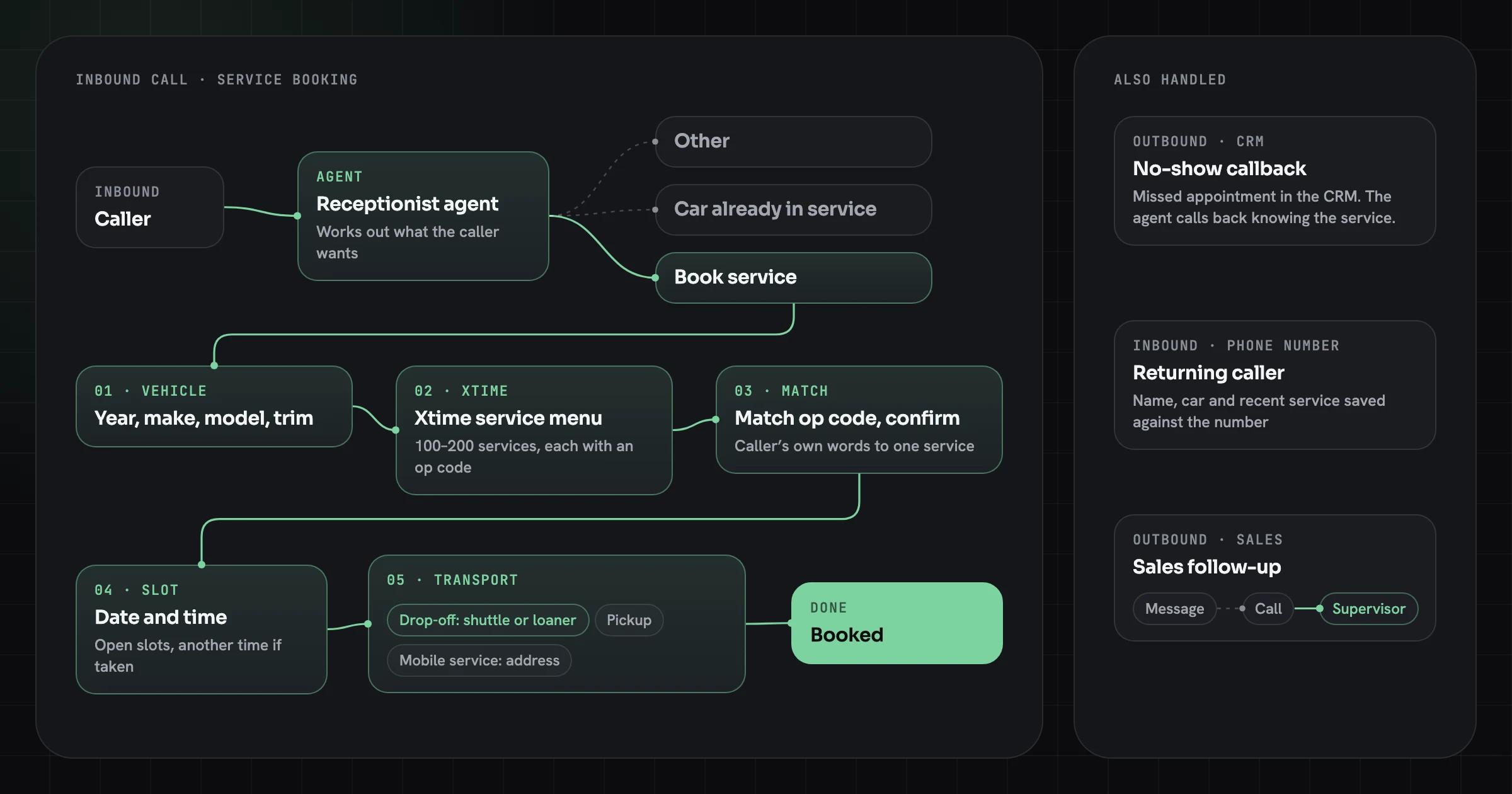
One booking call touches Xtime at three points: the vehicle’s service menu, the open times for the chosen service, and the appointment itself. Everything else is the agent’s own logic and its own store.
The table is our recommended data flow, in the order the Innovative AI case study describes the call. It shows which system each step reads or writes, not how the conversation sounds.
| Step | Data read or written | Source of truth |
|---|---|---|
| 1. Route the call | The caller’s intent: book service, check on a car in for work, or something else | The caller |
| 2. Identify the vehicle | Year, make, model and trim | The caller |
| 3. Load the service menu | That vehicle’s services, each with its own op code | Xtime |
| 4. Choose the service | One op code from that menu, confirmed with the caller | The caller’s confirmation |
| 5. Find a time | Open times for that service on the requested day | Xtime |
| 6. Settle transport | The transport option and, where needed, an address | Per-dealer configuration |
| 7. Book | The appointment: vehicle, op code, time | Xtime |
Steps 3, 5 and 7 are the only Xtime calls, and step 3 has to come before any talk about times: the agent cannot offer a slot until it knows which service it is booking, and it cannot know the service until it has the vehicle. Transport options differ by dealership, so they live in configuration rather than in code. The case study covers the menu sizes and transport choices from that build.
Returning-caller recognition sits beside this flow rather than in it: on that build, the caller’s name, vehicle and recent service were saved against the phone number, so a repeat caller skipped questions the agent could already answer. The same system also looked up and confirmed existing appointments, and placed follow-up calls when the dealership’s CRM showed a booked customer had not arrived.
What the voice agent needs on top of the API
A voice agent needs five system-side pieces that no scheduling API provides: a menu-constrained output, an availability check inside the booking step, per-dealer transport configuration, a caller profile store and a create step that is safe to retry. The rest of this section is our engineering recommendations, not a description of the Innovative AI system and not Cox documentation. How the conversation itself should sound, from matching a caller’s words to offering another time, is in our guide to AI service scheduling for dealerships.
A menu-constrained output. The model’s choice of service should be an op code from the menu Xtime returned for that vehicle and nothing else. Pass the menu in as the only allowed values and validate the answer against it in code, so a request for “the 30k service” can only resolve to a line that exists. An answer that matches nothing is a handoff, never a guess.
Availability inside the booking step. Treat the open times read earlier in the call as a hint. The create step reads availability for that service and time again and books only if the slot is still returned, so the check and the write sit together in one function.
Per-dealer transport configuration. Store each rooftop’s options as data: whether it offers a shuttle, loaners, pickup or mobile service, and the service area for the last two. The agent asks only about options that dealership’s record lists, and the address field is required only when pickup or mobile service is chosen.
A caller profile store. Name, vehicle and recent service saved against the phone number live in your own store, not in Xtime. It is personal data: keep only those fields, set a retention period and delete profiles that pass it.
A retry-safe create. Calls drop. If the line cuts out after the agent sent the booking and before it heard the result, a naive retry or a callback can book the same car twice. Record each booking attempt on your side, tied to the call, before you send it. On any retry, check that record and the customer’s existing appointments first, and only create when neither shows the booking. The same confirm-before-write pattern appears in our AI agent guardrails checklist.
Where VinSolutions fits: the sales side
VinSolutions is Cox Automotive’s dealership CRM, so on an all-Cox stack the service side and the sales side come from the same company. VinSolutions calls itself “the AI-powered CRM with exclusive Cox Automotive shopper data and integrations with top industry providers”, and Cox’s brand list carries it next to Xtime (both as of October 2026).
Partner access points to the same place. VinSolutions’ integrations page tells vendors “If you are interested in becoming an integrated partner please visit our API Storefront”, and that link goes to Cox Automotive’s developer site, the one that hosts the Xtime reference documentation (as of October 2026).
On the Innovative AI build, sales follow-up runs through VinSolutions. The agent works through leads who visited a dealership and didn’t buy: a message first, then a call to learn the reason, such as price or a different car, and to capture what they want. It closes by telling them a supervisor will call back.
When a dealer group runs more than one vendor
Our build was all Cox Automotive: Xtime for service, VinSolutions for sales, and other Cox products at other rooftops. Not every group is. Cox’s own brand list, as of October 2026, includes Xtime for service, VinSolutions for CRM and Dealertrack for dealership management. A group whose CRM or dealer management system comes from another vendor is dealing with that vendor’s access program as well. CDK Global, for example, runs its own automotive API platform, Fortellis; the fortellis.io footer says “Fortellis is a trademark of CDK Global, LLC”. That means a second company, a second contract and a second style of API, and it was not part of the Innovative AI build.
The design we recommend for any mix of systems, including several products from one vendor, is one internal model and one adapter per system:
- One internal shape for a vehicle, a service, an appointment and a lead, used by the agent’s logic everywhere.
- One adapter per vendor, which translates that shape to Xtime, to VinSolutions or to the next system, and owns its credentials and error handling.
- Per-dealer configuration that says which adapter handles scheduling and which handles leads at each rooftop.
The agent’s prompts and tools then talk about appointments and leads, never about a vendor. Adding a dealership on a different stack means writing or reusing an adapter, not rewriting the call flow.
Rolling out dealer by dealer
An Xtime integration goes live one dealership at a time, because each one opts in with its own invitation code. Each rooftop also brings its own menu: op codes vary by dealership and system, and myKaarma’s documentation says dealerships “may contain a large number of opcodes, sometimes exceeding thousands”, which is why its API pages through them (myKaarma docs, as of October 2026).
Our recommendation is one test rooftop first, with a checklist per dealership after it:
- Invitation accepted and test bookings visible to the service team.
- Menus pulled for the vehicles that dealership services most, and a sample of plain-language requests matched against them.
- Transport options set: shuttle, loaner, pickup, mobile service, and the service area for the last two.
- Handoff numbers and hours for service advisors and the sales desk.
- Test calls in noisy settings and with a range of accents, since those, along with requests too odd to match, were behind our misses.
Only move to the next rooftop when the first one’s service team trusts what lands in its schedule.
When not to build your own integration
A single dealership that wants after-hours answering and basic booking should buy a product that is already integrated with Xtime. The case is clearest on the integration side: a product already integrated with Xtime has done the partner work once, and a one-store build would repeat the agreement, review and demo for one invitation code. Xtime’s Schedule page lists a voice add-on (Brooke.ai), as of October 2026.
Building custom is our business, so read this with that bias in mind. The wider buy-or-build call, including when a custom agent pays off, is in the buy-or-build section of our scheduling guide.
What an integration adds to the build cost
An Xtime integration fits inside a Fixed-Price Build of $25k–$120k, and where it lands in that band depends on how many systems the agent talks to, not on the Xtime connection alone. Scheduling through Xtime with the op-code matcher, slot negotiation and retry-safe booking is one scope. Adding VinSolutions for sales follow-up, outbound calls and per-dealer adapters is a larger one. We fix the price after a $5,000 Discovery Sprint, and the pricing page shows the model.
Two costs sit outside our quote: Cox’s partner and per-dealer fees, and the time the business review and certified demo take. Put both in the budget before the build starts.
Before you scope it, have these ready: who will hold the Xtime agreement and the CRM access, the list of rooftops and the systems each one runs, the transport options each offers, and where calls should go when the agent hands off. With those four answers, a discovery sprint can price the work. For how this looks across the dealership, see our page on car dealership software.
Sources
- Xtime API report card, Supergood (third-party assessment, last verified October 2026)
- Xtime Schedule, Xtime (Cox Automotive)
- Our brands, Cox Automotive
- Auto Dealership CRM & Sales Software, VinSolutions (Cox Automotive), as of October 18, 2026
- Integrations with VinSolutions, VinSolutions (Cox Automotive), as of October 18, 2026
- Fortellis, Fortellis (CDK Global), as of October 18, 2026
- How to get operation codes and service-menus, myKaarma, as of October 2026
