

AI service scheduling for car dealerships: how the call works
What an AI voice agent has to do between “I need my car looked at” and a confirmed service appointment, step by step, from a dealership build we shipped.

On the dealership voice agents we built for Innovative AI, each vehicle’s service menu held 100–200 services, and every one of them had its own op code. No caller ever says an op code. They say something like “it’s making a grinding noise” or “whatever’s due at this mileage”, and the agent has to get from that sentence to one line on that car’s menu before it can ask about a time.
That matching step is the part of the call a script or keypad menu can’t do. The rest of the call (vehicle, time, transport) is ordinary slot-filling, but each part has a rule that breaks the booking if you skip it. This guide walks through the call from the caller’s side, in the order our agents ran it. It is the same flow we build into custom AI voice agents for service departments.
How does an AI agent book a dealership service appointment?
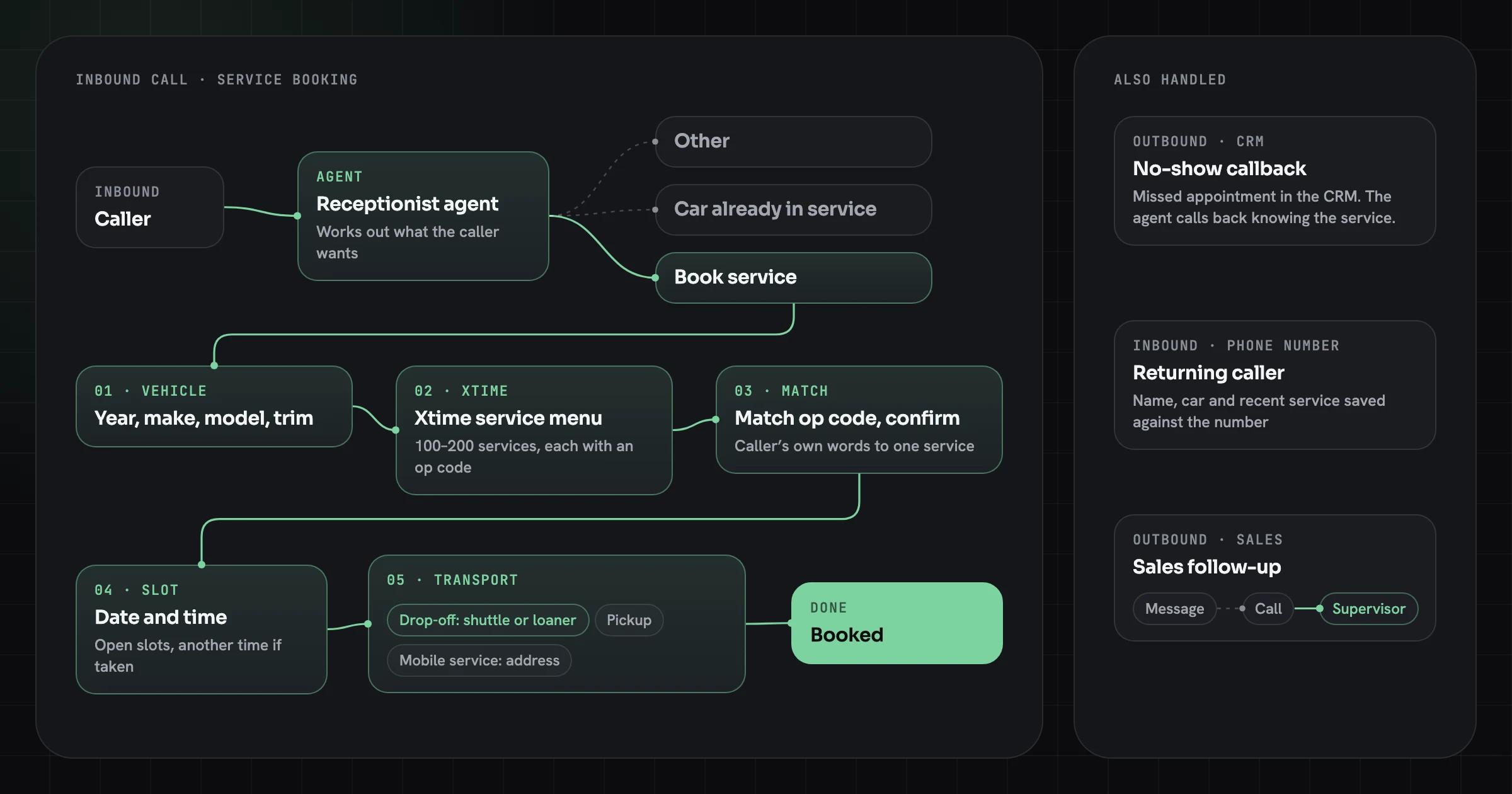
An AI agent books dealership service by identifying the vehicle, loading that vehicle’s service menu, matching the caller’s description to one service on it, finding an open slot, settling transport and writing the appointment into the scheduler. On the Innovative AI build, a receptionist agent took the call first and sent only booking requests down this path; questions about a car already in for work went elsewhere. After that routing, the booking ran in six steps:
- Vehicle. The agent asks for year, make, model and trim.
- Menu. It fetches that vehicle’s available services from Xtime, the dealership’s scheduler.
- Need. The caller says what they want in their own words. The agent maps it to an op code on the menu and reads the service back for a yes.
- Time. The agent asks for a date and time and checks it against the dealership’s open appointments. If the slot is taken, it offers others.
- Transport. Drop-off, pickup by the dealership or mobile service at home. Pickup and mobile need an address; drop-off callers get offered a shuttle or a loaner.
- Book. The agent books the appointment for that op code and time.
The Innovative AI case study covers what else those agents did. Here we stay with the booking call.
Why the vehicle comes first
The vehicle comes first because the service menu depends on it. A synthetic oil change on one engine is a different line, with a different labor time and price, from the same service on another, and some services only exist for some models. Until the agent knows the car, it has nothing to match the caller’s words against.
Xtime describes its menus as dynamic menus that reflect the dealership’s own pricing, promotions and service recommendations. On the integration side, Supergood’s report card on the Xtime API (last verified October 2026) says partner integrations create appointments by year, make and model or by VIN. The vehicle is the key the scheduler works from, so it is the first thing the agent needs.
Ask for year, make, model and trim rather than the VIN: callers know what they drive, and few can read a 17-character VIN off the door jamb while holding the phone. Trim matters more than callers expect. If two trims of the same model carry different menus, the agent should ask which one, or ask for the VIN only then.
Two small rules we recommend for this step:
- Confirm the vehicle once, in one sentence. “A 2021 Camry SE, is that right?” A wrong model year loads the wrong menu, and everything after it is wrong too.
- Accept partial answers. Many callers give make and model and stop. The agent asks for the missing piece rather than starting over.
Matching the caller’s words to an op code
An op code is the dealership’s identifier for one service operation, and matching is the step where the agent turns a caller’s description into one of them. Dominion DMS’s documentation defines operation codes as codes that “help categorize service tasks and their prices”: each carries a description, labor hours or a fixed price, parts and the makes, models and years it applies to. myKaarma’s documentation notes that a dealership may have a large number of them, “sometimes exceeding thousands.”
A caller never needs to know any of that. Callers describe symptoms (“there’s a clunk when I go over bumps”), ask for scheduled maintenance by mileage, or name a service loosely (“tires”). Our agent took the description, compared it with the services on that vehicle’s menu and picked the closest match. Then it confirmed in plain words before going further, along the lines of: “That sounds like a suspension inspection. Shall I book that?” Booking the wrong op code means the wrong labor time is reserved and the technician starts the job without the right parts, which costs more than a five-second confirmation.
“Tires” is a good example of why the confirmation is not optional. If one tire, two tires and four tires are separate menu lines with separate codes, the agent has to ask how many before it can pick one.
Not every description maps to a menu line. Our recommendation for that case, which is a design choice rather than something Xtime prescribes:
- If the caller describes a symptom with no clear match, book the dealership’s general diagnosis or inspection service, if it has one, and put the caller’s own words in the appointment notes for the advisor.
- If the request is outside the menu altogether (a body repair, a warranty dispute), don’t force a match. Hand the call to an advisor or take a callback.
- Never invent a service. The agent only offers lines the scheduler returned for that vehicle.
How menus and op codes reach the agent on the system side, including partner access, is covered in our Xtime API integration guide.
Checking open slots and offering another time
The agent checks the requested date and time against the open appointments the scheduler returns and, if that slot is gone, offers the closest alternatives. On our build the caller named a time, the agent compared it with the dealership’s available appointments and, when it wasn’t free, worked out another time with the caller instead of failing the call.
The one hard rule: the agent never books a time the scheduler didn’t return as open. A language model will happily agree to “Tuesday at 8” because it sounds reasonable. The time has to come from the availability response, not from the conversation.
What works when the first choice is taken:
- Offer two times, not a list. “Tuesday is full in the morning. I have 1:30 that day or 8:00 on Wednesday.”
- Keep the caller’s constraint. If they asked for a morning, offer the next mornings before an afternoon.
- Re-check before writing. Slots go while a caller is deciding, so the agent confirms availability at the moment it books.
- If nothing fits, offer a callback from an advisor rather than ending the call with nothing.
Drop-off, shuttle, loaner, pickup or mobile service
Transport is the last question before booking, and it decides what else the agent has to collect. On our build the agent asked whether the caller would drop the car off, wanted the dealership to pick it up, or wanted mobile service at home. Drop-off callers were then offered a shuttle or a loaner. Pickup and mobile service needed an address; drop-off didn’t.
| Option | What the caller gets | What the agent collects |
|---|---|---|
| Drop-off | Brings the car in and waits or leaves | Nothing extra; tells the caller to come to the dealership |
| Drop-off with shuttle | A ride from the dealership | The shuttle request, recorded so an advisor sees it |
| Drop-off with loaner | A car to use during the service | The loaner request, recorded so an advisor sees it |
| Pickup | The dealership collects the car | Pickup address |
| Mobile service | The service is done at the caller’s home | Service address |
Which options exist is the dealership’s decision, and the agent should only offer the ones it runs. Mobile service on our build was something the dealerships themselves offered. Xtime lists a direct integration with Lyft for rideshare as of October 2026, and in 2020 Auto Remarketing reported that Xtime Schedule could show loaner and valet availability. If the integration can see loaner availability, the agent can promise one; if it can’t, it should say an advisor will confirm.
Cox Automotive’s 2025 Service Industry Study of 1,974 vehicle owners found that owners want easy scheduling and flexible service options, and Cox recommends after-hours scheduling, pickup and delivery, and rideshare integration to win service visits back. A voice agent that also answers after hours and settles transport on the same call would cover several of those at once.
Returning callers and existing appointments
Returning callers shouldn’t be asked for what the dealership already knows. On our build, the caller’s name, vehicle and recent service were saved against their phone number, so a second call from the same number skipped the vehicle questions.
Two cautions. A phone number identifies a line, not a person: households share cars and phones, so the agent confirms (“Is this about the Camry again?”) rather than assuming. And a stored record is only a shortcut; if the caller names a different car, the agent loads that car’s menu.
The same lookup let callers check bookings they already had. The agent could bring up a caller’s existing appointments and confirm them, so a caller checking a booking doesn’t have to wait for the service desk.
Storing caller data has rules. In the EU, GDPR Article 13 requires the business to tell people what it collects at the time it collects it, which on a phone call means the greeting. Our EU AI Act and GDPR checklist covers the disclosure wording and retention.
Routing the calls that aren’t bookings
Not every caller wants to book, so the first job is routing. Our receptionist agent asked what the caller wanted and sent them down one of three paths: book a service, check on a car already in the shop, or anything else. A wrong route wastes the caller’s first minute, so a receptionist agent should ask rather than guess when the opening sentence is unclear.
Checking on a car already in service is a status question, not a booking, and it needs a different lookup. Anything the agent can’t handle, from a billing question to a complaint, should go to a person with a short summary attached, so the caller doesn’t repeat themselves.
Outbound calls follow the same logic in reverse. When the dealership’s records showed a customer had missed their appointment, our agent called them back already knowing which service had been booked. That flow has its own consent rules, covered in our guide to no-show follow-up calls.
Why the last 1% of bookings failed
Of callers who went ahead with booking through our agent, 99% were booked, by our own count. The remaining 1% failed for three reasons.
- Requests the agent couldn’t map. Some callers described something so unusual or vague that the agent found no match, and the caller got annoyed. Our recommendation is to hand over early: after one failed clarification, offer an advisor.
- Pronunciation and accents. Speech recognition does not work equally well for every speaker. A 2020 PNAS study by Koenecke and colleagues tested five commercial systems and found an average word error rate of 0.35 for Black speakers against 0.19 for white speakers. The systems have changed since, but the lesson holds: test with recordings from your own callers, not a demo voice.
- Background noise on the caller’s side. Calls from a road, a shop floor or a car with the windows down lose words. The agent should read back the details that matter (vehicle, service, time) so a misheard word gets caught before booking.
We’d cap clarification attempts and hand over sooner for all three. A quick handoff can turn a call the agent can’t follow into a callback instead of a hang-up.
What to measure after launch
Measure booking completion among callers who chose to book, not among all calls. Many calls are status checks, routing or questions, and counting them against the booking rate hides whether the booking flow works. Our 99% was measured that way, on one build, and isn’t a forecast for another dealership.
Track these from the first week:
- Booking completion: booked appointments divided by callers who said they wanted to book.
- Handoff rate: calls passed to a person, split by reason (no menu match, outside scope, caller asked).
- Failures by cause: unmapped request, misrecognition, noise, scheduler error, caller hung up.
- Wrong-op-code rate: appointments an advisor had to change after booking, which shows whether matching works.
- Outcome at the dealership: booked appointments that arrived, so you can see the no-shows.
If you are still deciding whether the phone is worth automating, our guide to the cost of missed calls sets out how to put a number on what goes unanswered.
Buy a scheduler add-on or build your own agent?
Buy if one rooftop needs calls answered and service booked on standard menus; build if you need your own call logic across several systems. We sell the build option here, so weigh this with that in mind.
Xtime Schedule lists a Brooke.ai add-on that answers inbound service calls, handles requests and schedules appointments, as of October 2026. For a single dealership already on Xtime, an add-on like that is the shorter path, and we would buy it and revisit in a year.
A custom agent pays off when the flow is yours: a receptionist that routes service calls, outbound no-show and sales-lead follow-up in the same system, matching rules tuned to your menus, and transport options your scheduler’s add-on doesn’t cover. The Innovative AI build combined a receptionist, service booking, no-show and sales-lead follow-up, and caller memory across multiple dealerships.
On price, a scheduling voice agent falls in our $25k–$120k fixed-price band, and the price is set after a $5,000 Discovery Sprint. What pushes a dealership build up the band is the integrations and the matching layer, more than the call itself. The pricing page has the model, and our AI voice agent cost guide breaks down the running costs per minute. For how voice agents fit around DMS, CRM and scheduler software, see car dealership software and voice agents.
If you are scoping one, start with a week of call recordings and your service menu export: those two files show how many calls are bookings and how far callers’ words sit from your op codes.
Sources
- Automotive appointment scheduling software, Xtime (Cox Automotive), as of October 2026
- Xtime API: The API Report Card, Supergood, last verified October 2026
- Understanding service op codes, Dominion DMS, as of October 2026
- How to get operation codes and service-menus, myKaarma, as of October 2026
- New Cox Automotive study finds dealerships have lost 12% of service visits to competition since 2018, Cox Automotive (Nov 11, 2025)
- Clutch and Xtime unveil Cox Automotive mobility solution for fixed ops, Auto Remarketing (Feb 11, 2020)
- Racial disparities in automated speech recognition, Koenecke et al., PNAS (2020)
