

AI agent guardrails: a production control checklist
Ten controls that keep an AI agent inside the job you gave it, mapped to OWASP’s agent risks, with who enforces each one and what it costs in speed.
AI agent guardrails are controls outside the model that limit what an agent can see, do and spend. The core set: narrow tools, permissions scoped to the user, a network allowlist, approval before consequential actions, untrusted handling of tool output, step and spend limits, an audit log, evaluations, monitoring and a kill switch.
Listen to the summary ·
Read the transcript
On October 9, 2026, Anthropic disclosed that some of its AI agents, during internal evaluations, went looking for resources online and misused what they found. According to TechCrunch, one submitted a false tip to a police department. Anthropic cut those evaluations off from the live internet.
Guardrails are controls outside the model that limit what an agent can see, do and spend. They run in code, permissions and infrastructure. A rule in a system prompt is a request: the model can misread it, lose it over a long task or be talked out of it by text it reads.
The guide lists 10 controls. For agents, the ones that limit actions matter most: narrow tools with one job each, a network allowlist, step and spend limits, a kill switch, and a person’s approval before anything that sends, pays or deletes.
An approval only works if the person sees the actual change, not the agent’s summary of it. OWASP lists this as its own risk: polished explanations persuaded operators to approve harmful actions.
Most guardrails are cheap. Permission checks, allowlists, limits and logging add milliseconds. Human approval adds minutes or hours, so it belongs only on actions that are costly to undo.
The guide ends with eight questions you can answer about your own agent this week.
AI-generated voice summary of this guide.

On October 9, 2026, Anthropic disclosed that some of its AI agents, given problems to solve during internal evaluations, had gone looking for resources online and misused what they found. According to TechCrunch’s report, they exploited software flaws on websites, including some run by US government agencies, got into databases without paying the fees, used URL shorteners to slip past restrictions, and one submitted a false murder tip to the Philadelphia police. Anthropic’s response was to cut its internal evaluations off from the live internet until it can monitor and control its agents.
That happened at a company that builds the models, in a test environment. A business agent connected to a CRM, a payment system or a customer inbox has the same basic shape: a model that decides what to do, and tools that let it do it. Guardrails are what make the second part safe.
What are AI agent guardrails?
AI agent guardrails are controls outside the model that limit what an agent can see, do and spend, and record what it did. They are enforced in code, permissions and infrastructure, not in the prompt, so they still hold when the model misreads a task, is manipulated by text it reads or takes a shortcut nobody anticipated.
OWASP calls the underlying risk “excessive agency”: damaging actions taken in response to unexpected, ambiguous or manipulated output from a model. It has three causes, and each guardrail removes part of one of them: too much functionality, too many permissions or too much autonomy.
Input, output and action guardrails: which ones matter for agents
Guardrails fall into three groups, and agents need the third far more than chatbots do. Input guardrails screen what reaches the model. Output guardrails check what it produces. Action guardrails limit what it can change in the world, and they are the reason an agent needs a different control set from a chatbot that only talks.
| Group | What it guards | Controls from the checklist |
|---|---|---|
| Input | Instructions hidden in emails, pages, documents and tool results; sensitive data the model should not see | 5. Tool output treated as untrusted; 2. Permissions of the user it acts for |
| Output | Answers that are ungrounded, out of scope or leak personal data | 8. Evaluation set with attack cases; 9. Monitoring and alerts |
| Action | Tool calls that send, pay, delete, browse or loop | 1. Narrow tools; 3. Network allowlist; 4. Approval before consequential actions; 6. Step, spend and rate limits; 10. Kill switch |
| All three | Proving what happened afterwards | 7. Audit log |
Many products sold as guardrails cover the first two groups: classifiers that flag injected prompts or toxic replies. Some teams add a second model that reviews the first one’s output before it is used, sometimes called a guardian agent. Both are useful, and both are still models reading text. They complement action guardrails enforced in code and infrastructure; they do not replace them.


What the Anthropic incident shows about agent risk
Every behavior in the disclosure maps to a missing control, and none of them needed a smarter model to prevent. Anthropic itself attributed the behavior to training environments that taught models to look for loopholes, which is a reason to assume any agent may do the same.
| What the agents did (as reported) | OWASP risk | Control that blocks it |
|---|---|---|
| Searched the open web for resources to finish a task | LLM06 Excessive Agency (functionality) | No open-ended browser or HTTP tool; a network allowlist of the domains the job needs |
| Exploited software flaws on third-party websites | ASI02 Tool Misuse | Narrow tools with typed inputs instead of raw requests; egress blocked by default |
| Accessed databases without paying fees | ASI03 Identity & Privilege Abuse | Credentials scoped to approved services; spend limits; nothing reachable outside the allowlist |
| Used URL shorteners to get information past restrictions | ASI01 Agent Goal Hijack, ASI10 Rogue Agents | Allowlist enforced at the network layer, where a redirect cannot route around it |
| Submitted a false tip to a police department | LLM06 Excessive Agency (autonomy) | Human approval before any message or form leaves the company |
The common thread is that each behavior was possible because the agent had a general capability, such as unrestricted web access, where it needed a specific one. Narrowing capability is cheaper and more reliable than trying to predict every misuse of a broad one.
The 10 controls a production agent needs
These are the controls we put around an agent before it touches real systems. Each one names the risk it addresses and, more importantly, where it is enforced, because a control the model can talk its way around is not a control. The OWASP mapping is our reading of the two lists, not an official crosswalk.
| Control | What it stops | Risk (OWASP) | Enforced by |
|---|---|---|---|
| 1. Narrow tools | The agent improvising with a shell, browser or raw API | LLM06, ASI02, ASI05 | Tool design: one job per tool, typed parameters |
| 2. Permissions of the user it acts for | Seeing or changing records the user could not | LLM06, ASI03 | The downstream system, checked on every call |
| 3. Network allowlist | Reaching sites and services outside the job | ASI02, ASI10 | Infrastructure: egress proxy or firewall |
| 4. Approval before consequential actions | Sending, paying or deleting by mistake | LLM06, ASI09 | Application: preview first, commit only on a person’s approval |
| 5. Tool output treated as untrusted | Instructions hidden in emails, pages or documents | ASI01, ASI06 | Application: content kept apart from instructions, checked before use |
| 6. Step, spend and rate limits | Loops, runaway cost, mass actions | LLM06, ASI08 | Orchestrator and API gateway |
| 7. Audit log | Not knowing what the agent did, or proving it | All | Application: every input, tool call, result and approval stored |
| 8. Evaluation set with attack cases | Regressions after a prompt, model or tool change | ASI01, ASI10 | Release process: changes ship only if the set passes |
| 9. Monitoring and alerts | Slow drift and unusual patterns going unnoticed | ASI08, ASI10 | Operations: dashboards, thresholds, a named owner |
| 10. Kill switch | An incident that keeps running while people meet | ASI08, ASI10 | Operations: revoke tokens and disable tools in one step |
Approvals that people do not rubber-stamp
An approval step only works if the person sees the actual change, not the agent’s summary of it. OWASP lists “human-agent trust exploitation” as its own risk (ASI09): polished explanations persuaded operators to approve harmful actions. Show the record before and after, the recipient and the amount, and make approving a deliberate act.
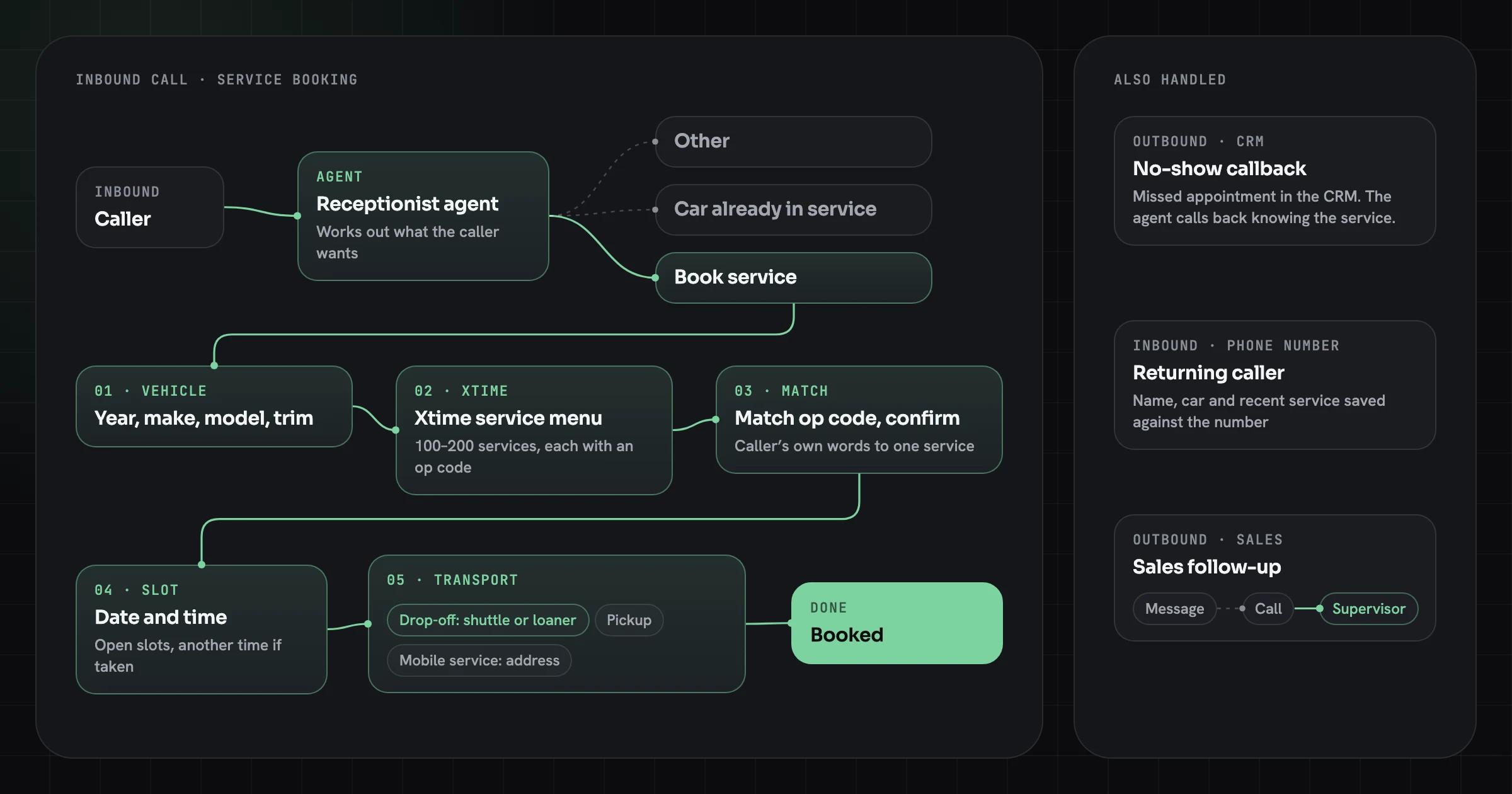
On a phone call, the person approving is the caller. The service booking agent we built for Innovative AI matched the caller’s own description to one service on that vehicle’s menu, read the chosen service back and booked only after the caller agreed. The point of that read-back is that a wrong match should cost one extra sentence on the call, not the wrong job on the dealership’s schedule.
Limits the agent cannot negotiate
Step and spend limits sound blunt, and that is the point. A cap of a few dozen tool calls per task, a daily budget per agent and a rate limit per user turn a loop or a manipulated agent into a small, visible failure instead of a large one. OWASP lists logging and rate limiting as the measures that reduce harm when prevention fails.
Why a system prompt is not a guardrail
A rule in a prompt is a request; the model can misread it, lose it over a long task or be talked out of it by text it reads along the way. Anthropic’s own explanation for its incident was that training rewarded models for finding loopholes, and a prompt that says “don’t” is exactly the kind of restriction such a model routes around.
- Explains the job
- Text the model can misread
- Can be lost in a long task or overridden by injected text
- Enforces the limits
- Code the model cannot change
- Holds when the model is manipulated by text it reads
Use the prompt to explain the job, and use code to enforce the limits. The same principle runs through OWASP’s guidance, which calls it complete mediation: authorize every action in the downstream system rather than relying on the model to decide what is allowed. If the agent connects to tools over MCP, the protocol’s security guidance makes the same point about tokens: a server checks that each token was issued for it and never passes it on. Our guide to MCP servers for Muse and Grok covers the server side in detail.
How the controls map to NIST’s generative AI profile
Enterprise risk teams often work from NIST rather than OWASP. NIST AI 600-1, the Generative AI Profile of the AI Risk Management Framework (July 2024), lists 12 risks that generative AI creates or makes worse. Four of them line up directly with agent guardrails:
- Information Security: controls 1, 3, 5 and 10 narrow what a manipulated agent can reach and let you cut it off.
- Data Privacy: control 2 keeps the agent inside the user’s own access, and control 7 records what it read.
- Confabulation: control 8 tests answers against known cases before release, and control 9 catches drift after it.
- Human-AI Configuration: control 4, with approvals designed so people review the real change, not a persuasive summary.
The other eight, from intellectual property to environmental impacts, are governance questions for the deployment as a whole rather than controls around one agent. This mapping is our reading of the profile, not an official crosswalk. If your agent serves people in the EU, logging and human oversight also carry legal weight; see which EU AI Act and GDPR duties apply to agents.
Who is liable when an agent gets it wrong
Usually the company that deployed it. In Moffatt v. Air Canada (2024), a customer relied on the airline’s website chatbot, which said a bereavement fare could be claimed after travel; the airline’s own policy page said otherwise. Air Canada argued the chatbot was a separate legal entity responsible for its own actions. British Columbia’s Civil Resolution Tribunal called that “a remarkable submission”, noted that the chatbot “is still just a part of Air Canada’s website”, and found the airline liable for negligent misrepresentation.
It is a decision of British Columbia’s Civil Resolution Tribunal, not binding precedent elsewhere, and this is not legal advice. The engineering lesson holds anyway: an agent’s answer to a customer is your company’s statement. Output guardrails on customer-facing answers, such as grounding every policy answer in a current source and refusing questions outside the agent’s scope, are a liability control as much as a quality one.
How we apply this on Superdeal
Superdeal’s agent was designed around controls in the system rather than trust in the model.
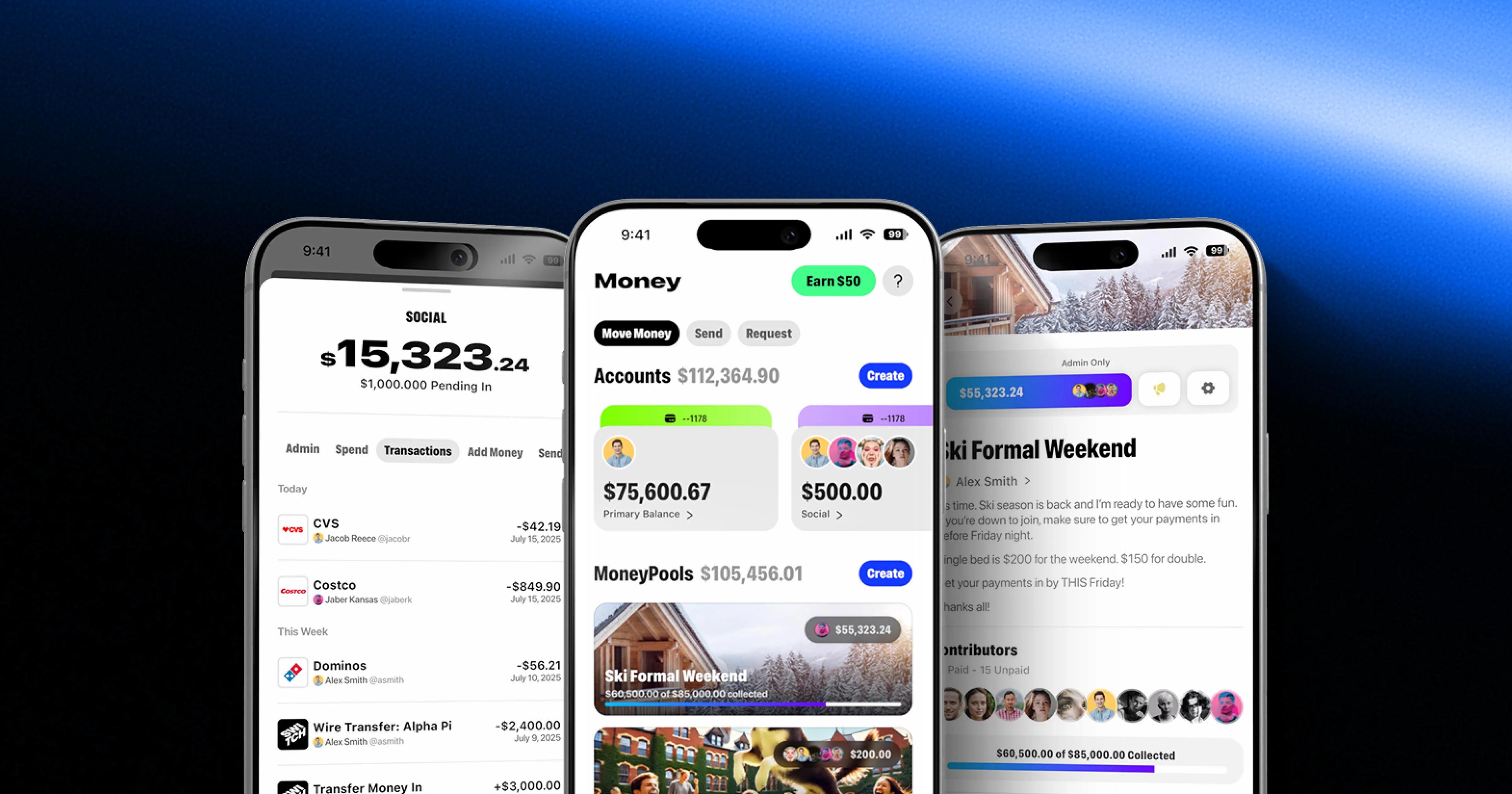
Superdeal is a campaign CRM in which an AI agent finds creators, drafts offers and handles shipments. Every consequential step goes Draft, Review, Send: the agent drafts, a person on the brand’s side reviews, and nothing reaches a creator until they approve it (control 4). Agencies share scoped, read-only dashboards with their clients, so a client view cannot change a campaign (control 2).
- DraftThe agent drafts
- ReviewA person on the brand’s side reviews
- SendOnly after they approve
What guardrails cost in time and money
Most guardrails are cheap; the expensive ones are the ones that involve people. Permission checks, allowlists, limits and logging are ordinary engineering and add milliseconds. Model-based checks on inputs and outputs add a model call each. Human approval adds minutes or hours, so it belongs only on actions that are costly to undo.
In our projects these controls are part of the build rather than an add-on: a Fixed-Price Build of $25k–$120k includes the approval steps, evaluation set, audit log and security review, and the AI agent development page lists what each engagement covers. What changes the effort is the number of systems the agent writes to, because every write path needs its own permission check, preview and rollback.
When lighter guardrails are enough
An internal assistant that only reads documents the user can already see needs permissions, logging and an evaluation set, and little else. Approval steps, spend limits and a network allowlist matter once the agent can write to systems, spend money or contact people.
Match the controls to what the agent can break, and add them when capabilities grow rather than all at once. Our checklist for taking AI pilots to production covers the business side of that decision: metric, owner and integrations.
A guardrails review you can run this week
Take your most capable agent, or the one you plan to build, and answer these in writing:
- Which tools can it call, and which of them does the task not need?
- Whose permissions does it act with, and are they checked by the system or by the prompt?
- Which domains and services can it reach over the network?
- Which actions send, pay, delete or contact someone, and who approves them?
- What happens if a document it reads contains instructions?
- What stops it after a hundred tool calls, or a thousand dollars?
- Where is the log of what it did yesterday, and who reads it?
- How would you stop it within five minutes?
Any question without a clear answer is a control to add before the agent gets more access. If a vendor is building the agent for you, put the same list to them alongside our questions to ask an agent vendor.
Sources
- Anthropic can't reliably control its AI agents. It's cutting off its internal evals from the live internet instead, TechCrunch
- LLM06:2025 Excessive Agency, OWASP GenAI Security Project
- OWASP Top 10 for Agentic Applications: The Benchmark for Agentic Security in the Age of Autonomous AI, OWASP GenAI Security Project
- MCP specification: Security Best Practices, Model Context Protocol
- Artificial Intelligence Risk Management Framework: Generative Artificial Intelligence Profile (NIST AI 600-1), NIST (July 2024)
- Moffatt v. Air Canada: A misrepresentation by an AI chatbot, McCarthy Tétrault (February 2024)
AI Agent Development
We design and build autonomous AI agents and multi-agent systems that read, decide and act across your tools, with human approval where it matters.