
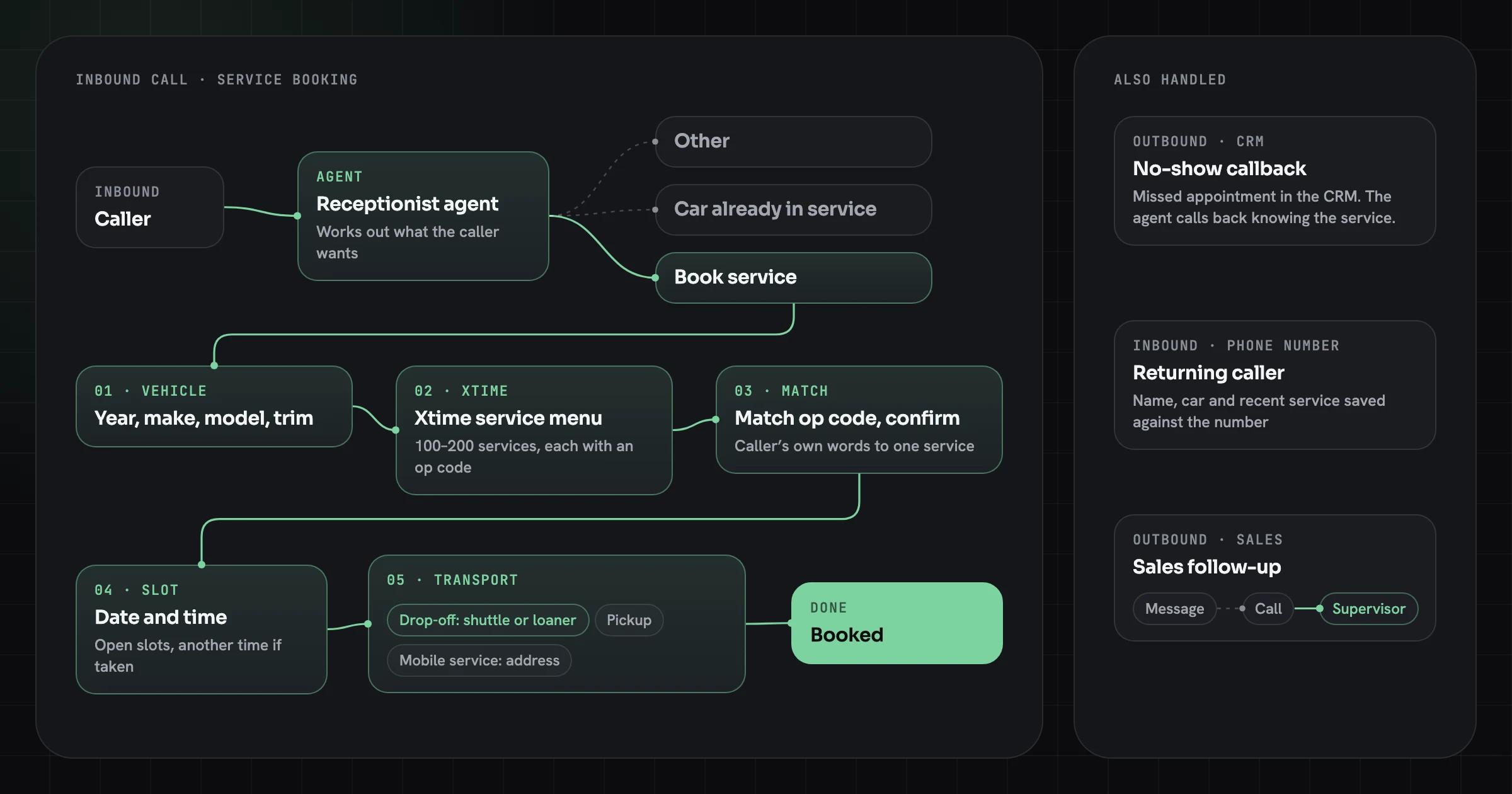

How to get your app into Meta Muse and Grok with one MCP server
Muse and Grok both let outside apps plug into their agents. What each one accepts, why a remote MCP server covers both, and what that server needs before an agent can act on your customers’ accounts.
Build one remote MCP server for your app. Grok accepts any MCP server reachable over the public internet as a custom connector. Muse takes connectors through Meta’s reviewed directory and through custom connectors its users add. The same server also works in Claude and Cursor. Plan OAuth, narrow tools and approval steps before you submit anything.
Listen to the summary ·
Read the transcript
xAI opened Grok to outside apps on May 6, 2026. Meta launched Muse on September 8. One remote MCP server gets your app into both, and it works in Claude and Cursor too.
MCP, the Model Context Protocol, is the open standard both hosts use to discover and call tools. Your server is a public HTTPS endpoint that lists your app’s actions as tools, signs users in with OAuth and decides whether each call is allowed. Grok accepts it as a custom connector, Muse users can add it the same way, and Meta reviews connectors for its own directory. As of October 18, 2026, developer guides disagree on how Muse’s custom connector flow works, so test it on your own account first.
Make the server enforce the limits, not the agent. Use tokens issued for your server only, small scopes, and separate read and write tools. Anything that moves money, deletes data or contacts a third party should return a preview first and commit only on a second, explicit call.
For an app with a clean, documented API, the server is a small build. If your app has no usable API, that comes first, and it is the bigger project.
The guide below has the full checklist and six test cases for every host.
AI-generated voice summary of this guide.

xAI opened Grok to outside apps on May 6, 2026. Meta launched Muse on September 8 and has since opened a connector directory with its own review. Two of the largest consumer agents now take requests like “reorder last month’s supplies” and hand them to someone else’s software. Whether that software is yours depends on one thing: a server the agent can call.
For both agents, that server is the same. A remote MCP server covers Grok today and Muse’s custom connectors, and it works in Claude and Cursor too. This guide covers what each agent accepts, what the server needs, and when you can skip it.
What does it take to get your app into Muse and Grok?
You need a remote MCP server: a public HTTPS endpoint that exposes your app’s actions as tools, signs users in with OAuth and enforces what each user may do. Grok connects to any such server as a custom connector. Muse users can add one as a custom connector, and Meta reviews connectors for its public directory.
MCP, the Model Context Protocol, is the open standard both hosts use to discover and call tools. Your server lists its tools, such as search_orders or create_invoice, with a description and an input schema. The agent reads that list, picks a tool for the user’s request and calls it with the user’s token. Your server decides whether the call is allowed.


It is the same work our AI agent development team does when an agent has to act inside a client’s own systems. Here the agent just belongs to Meta or xAI.
How Muse and Grok connect to outside apps
Each agent has a curated route and an open route, and the open routes are where an MCP server goes. The table uses each vendor’s own pages, rechecked October 18, 2026, plus two developer guides where Meta has published nothing. Both products change month to month.
| Route | Who adds it | Review | What your app provides |
|---|---|---|---|
| Muse directory | You submit it at platform.muse.ai; users find it in Muse | Meta reviews functional, security and legal requirements and runs end-to-end tests | Not specified on Meta’s page; check the submission form |
| Muse custom connector | Each user, from connector settings or by asking Muse in chat (guides differ) | None by Meta | A public HTTPS endpoint: a remote MCP server with OAuth, or an API Muse writes its own bridge to |
| Grok catalog connector | xAI | xAI’s own integrations, such as Google Workspace, Notion and GitHub | No submission route on xAI’s pages |
| Grok custom connector | Each user at grok.com/connectors; on Business and Enterprise, an admin first | None by xAI | An MCP server reachable over the public internet, with any authentication it needs |
Two details matter for planning. Muse runs each user’s agent on a dedicated cloud machine, so it calls your server from Meta’s cloud, never from the user’s laptop: a server on a private network or localhost will not work. And Muse’s custom connector flow is documented only by third-party developers so far, and they disagree. AnythingMCP’s Muse guide, checked September 25, 2026, describes pasting a server URL under Settings, Connectors and signing in with OAuth. Parallel’s guide from mid-September found no “add MCP server” setting and had Muse build the bridge on its own machine from a chat request. Either way Muse calls a public HTTPS endpoint, so the server you build is the same. Test the route on your own account before you promise it to customers.
Why an MCP server and not just your API or website
Agents can reach your app without your help: Muse can drive a browser, and developer guides show it writing its own integration against a public API. An MCP server is how you decide what the agent can do instead of leaving it to guesswork.
- Browser use breaks when your screens change, can’t tell a read from a write and leaves no clear audit trail of what the agent did.
- A raw API exposes every endpoint in the shape your frontend needed, which is rarely the shape an agent should call. A 40-parameter endpoint invites wrong calls.
- An MCP server exposes a short list of named tools with plain descriptions, behind your own sign-in and scopes. Every host that speaks MCP can use the same server, so you build it once.
The last point is the business case. Muse and Grok are two hosts; Claude and Cursor also connect to remote MCP servers. One well-built server works in all of them.
What a production MCP server needs
The MCP specification defines how authorization works, and most of the requirements land on your server. The checklist below follows the specification’s Authorization page and its Security Best Practices page (version 2025-11-25).
- Public HTTPS endpoint. Both hosts call from their cloud. All OAuth endpoints must be served over HTTPS.
- OAuth 2.1, with your server as the resource server. The server publishes Protected Resource Metadata (RFC 9728) so the agent can find your authorization server, either at a well-known URL or in the
401it returns to calls without a token. - Tokens issued for your server only. The specification requires the server to check that each token was issued for it, and forbids passing a client’s token through to another API. If your MCP server calls your own backend, it uses a separate token.
- Small scopes, raised on demand. Start with read-only scopes and ask for write scopes the first time a write tool is called (a
403withinsufficient_scope). Broad scopes such as*oradminare the specification’s own example of a mistake. - Separate read and write tools.
get_invoiceandvoid_invoiceshould never be one tool with a flag. - A confirmation step on high-impact actions. Muse checks with the user before sensitive actions such as sending email or buying something. Don’t rely on that. Make the server return a preview and require a second, explicit call to commit anything that moves money, deletes data or contacts a third party.
- Per-user limits and an audit log. Rate limits per token, and a log of every tool call with the user, the arguments and the result. When a customer asks what the agent did, you need the answer.
- Secure session handling. Session IDs must be random and must not stand in for authentication; every request is checked.
- Tool callAgent calls with the user’s token
- CheckToken issued for your server, scope allows it
- PreviewServer returns what would happen
- CommitA second, explicit call, logged
None of this is exotic. It is the same discipline as a public API, with one difference: the caller is a model that can be talked into things, so the server has to say no on its own. Our AI agent guardrails checklist covers the controls that sit around the agent itself.
Transport and endpoint: what the hosts call
The current MCP specification uses the Streamable HTTP transport: one HTTPS endpoint, such as https://api.example.com/mcp, that accepts both POST and GET. It replaced the older HTTP+SSE transport from the 2024-11-05 protocol version. Muse’s connectors work over Streamable HTTP, and Grok’s tunneling guide still covers servers on the older SSE transport, but build new servers on Streamable HTTP.
The transport page of the specification (version 2025-11-25) adds rules your server has to follow:
- One endpoint, two methods. Every client message is a new POST to the MCP endpoint. The server answers with JSON or opens a Server-Sent Events stream; a GET opens a stream for messages the server sends on its own, or returns
405if it doesn’t offer one. - Validate the
Originheader. If it is present and invalid, the server must return403 Forbidden. This blocks DNS rebinding attacks. - Check the protocol version. After initialization the client sends
MCP-Protocol-Versionon every request, and the server must return400for a version it doesn’t support. - Secure session IDs. If the server assigns an
MCP-Session-Id, it should be cryptographically random, and an expired session returns404so the client starts again. - Bind local servers to localhost. A development server should listen on 127.0.0.1, not on every interface.
How to test the server in each host before launch
Test in every host you plan to list, because each one discovers tools, handles OAuth and shows confirmations in its own way. A server that passes in one host can still fail sign-in in another.
For development, run the server locally behind a tunnel: xAI’s Grok documentation points to a tunneling service for exactly this, since a connector must reach the server over the public internet. Then add it as a custom connector in Grok, in Muse on a test account, and in Claude or Cursor.
Run the same cases in each host:
- Case 1Sign-in and isolationFirst sign-in through OAuth, and a second user who must not see the first user’s data.
- Case 2Scope step-upA read-only token calling a write tool, which should return 403 with insufficient_scope and trigger the scope step-up.
- Case 3Confirmed writeA write that needs confirmation: the preview call, then the commit call, then a retried commit with the same idempotency key.
- Case 4Lost tokenA revoked or expired token, mid-conversation.
- Case 5Rate limitA user hitting the rate limit, and the error message the agent receives.
- Case 6Prompt injectionA record whose text tells the agent to call a tool the user never asked for.
Keep the audit log open while you test. Every case above should leave a line in it.
How to design tools an agent uses correctly
Design tools around the jobs users ask for, not around your endpoints. An agent picks a tool by reading its name and description, so “reorder_from_previous_order: creates a draft order with the same items as a past order; does not charge” beats a generic post_orders.
Rules we apply to tool design:
- One job per tool, named with a verb and an object.
- Descriptions that state what the tool does not do, such as “does not send” or “draft only”.
- Few, typed parameters with enums wherever the values are known.
- Idempotent writes, with a client-supplied key, so a retried call doesn’t place two orders.
- Short, structured results with IDs the agent can pass to the next tool, not full records.
- Errors the agent can act on, such as “address missing: ask the user for a delivery address”.
Treat everything that comes back from the agent as untrusted input. A prompt injected into an email or a web page can make an agent call your tools with arguments the user never intended. Server-side checks, scopes and confirmations are what stop that, not the agent’s judgment.
Why the server should sit on permissions you already enforce
An MCP server should be a thin, well-described layer on top of the permissions your app already enforces, not a second set of rules. If the web app already isolates each customer’s data and keeps an audit trail, the MCP tools call the same services and inherit both. A server that re-implements access checks drifts from the app over time, and the gap between the two is where an agent ends up seeing data a user could not.
That also decides how much work the server is. When the app’s own API already checks permissions per user, the MCP layer is mostly tool design and OAuth. When the checks live in the frontend, they have to move into the backend first, for the app’s sake as much as the agent’s.
What an MCP server costs and how long it takes
For an app that already has a clean, documented API, the MCP server is a small build. Most of the effort goes on OAuth, tool design, confirmations and testing in each host, not on the protocol. We price it like any other project: a Fixed-Price Build inside our $25k–$120k band, with the scope and price fixed after a two-week Discovery Sprint. For a server on top of an existing API, we expect the low end of that band, and that placement is our judgment, not a quote.
What moves the price:
- No usable API. If the app’s logic lives in its frontend or in scripts, the API comes first, and that is the bigger project.
- Write actions that move money or reach customers, which need previews, confirmations and stronger tests.
- Multi-tenant data, where tenant isolation has to hold for every tool.
- Directory submissions, which add review cycles on Meta’s timeline, not yours.
Running costs are hosting and monitoring for one more service. The agent runs on Meta’s or xAI’s infrastructure, so its model usage is not on your bill. See pricing for the full engagement model, and AI agent development cost if the agent itself is yours to build.
When you don’t need an MCP server yet
Skip it for now if your customers don’t use these agents for the job your app does. A connector nobody calls is maintenance with no return.
It also isn’t the right first step when:
- Your app has no API. Fix that first; every integration, agent or not, will need it.
- A connector already exists, for example through an integration platform your customers use, and it covers the jobs they ask for.
- Your product is mostly reading, such as public prices or documentation. Agents can already read a fast, well-structured website; a server adds little.
- You need the directory listing specifically. Meta has not published a timeline or fee for directory review. Build the server for custom connectors and other hosts first; the directory is a second step.
If several of these apply, wait. If customers already paste data from your app into ChatGPT or Grok to get work done, that is the signal to build.
How to decide this week
Answer these for your own app, in writing:
- Which three jobs would a customer ask an agent to do in your app?
- Does an API already cover those jobs, with per-user permissions?
- Which of those jobs write data, move money or contact someone?
- Who owns the server after launch, including changes when Muse or Grok change their rules?
- Which hosts matter to your customers: Muse, Grok, Claude, ChatGPT or Cursor?
If the first two answers are clear, the server is a short project. If they aren’t, the work starts with the API, and a build vs buy decision for AI agents is the better place to start.
Sources
- Introducing Muse: The World’s First Personal AI Agent Built for Everyone, Meta
- Muse Connector Platform, Meta
- Meta Muse MCP: add custom connectors to Muse, AnythingMCP
- How to create custom integrations with Meta Muse, Parallel
- Connectors in web, iOS, and Android, xAI
- Grok connectors documentation, xAI
- Custom MCP server tunneling, xAI
- MCP specification: Transports (2025-11-25), Model Context Protocol
- MCP specification: Authorization (2025-11-25), Model Context Protocol
- MCP specification: Security Best Practices, Model Context Protocol
AI Agent Development
We design and build autonomous AI agents and multi-agent systems that read, decide and act across your tools, with human approval where it matters.