

Why sub-second latency makes or breaks a voice agent
Callers judge an AI agent in the pause before it speaks. Here is where those milliseconds go.
Listen to the summary ·
Read the transcript
In conversation, people leave about 200 ms between turns. When an agent takes two seconds to respond, callers start talking over it, or hang up.
Aim for the agent to start speaking within about one second of the caller finishing. On the phone network, ITU-T G.114 sets a target of 150 ms one-way delay. With the network at that limit in both directions and a 500 ms silence threshold, those two items alone take 800 ms, before transcription, the model or speech start. That is illustrative arithmetic, but it is why end-of-turn tuning and same-region hosting do more for latency than swapping models.
Vendor figures usually measure one model in isolation. ElevenLabs lists Flash v2.5 at about 75 ms, excluding application and network latency. The caller hears the whole chain.
To cut the wait, stream every stage, and send the first sentence to speech as soon as it is complete. Run lookups in parallel with a short acknowledgment, such as “Let me check that.”
Measure what the caller hears: the time from the end of their speech to the first audio of the reply, on a real phone call. Report the median and the 95th percentile. A steady 800 ms beats a 400 ms median with a slow tail of three-second turns. The guide below has a stage-by-stage latency budget.
AI-generated voice summary of this guide.

In conversation, people leave about 200 ms between turns. When an agent takes two seconds to respond, callers start talking over it — or hang up.
That pause is the first thing a caller judges, before they notice the voice or what the agent says, and most of it can be engineered away.
How fast should a voice agent respond?
A voice agent should start speaking within about one second of the caller finishing, and faster is noticeably better. That target comes from how people talk to each other, not from what the technology finds easy.
Conversation research is consistent here. Levinson and Torreira summarize it as gaps between turns “of the order of 200 ms”, while the time a person needs to plan even a short utterance is over 600 ms. People manage this by predicting how the other speaker will finish and preparing a reply while they are still listening. A comparison of ten languages by Stivers and colleagues found the same pattern everywhere: speakers avoid overlap and minimize silence, and the average gap varies by language only within about 250 ms of the cross-language mean.
The phone network has its own guideline. ITU-T G.114 sets a target of 150 ms one-way delay for most voice uses, before any AI is involved. Together, these numbers explain why a two-second silence feels broken: it is roughly ten times longer than the gap a caller expects.
Where the time goes
- Network inCaller audio reaches your services
- Speech to textFinishing the caller’s sentence
- Language modelDeciding what to say or which tool to call
- Text to speechProducing the first audio
- Network outAudio travels back to the caller, plus the network hops between each service
Each item hides a further delay. Before transcription can finish, the system has to decide that the caller has stopped talking. The model’s first token arrives quickly, but a long system prompt, a large model or a tool call can push the first useful sentence much later. Speech synthesis needs a full phrase to sound natural. And on a phone call, audio travels from the carrier to your telephony provider, then to each AI service and back, so a service hosted far from the others adds a round trip on every turn.
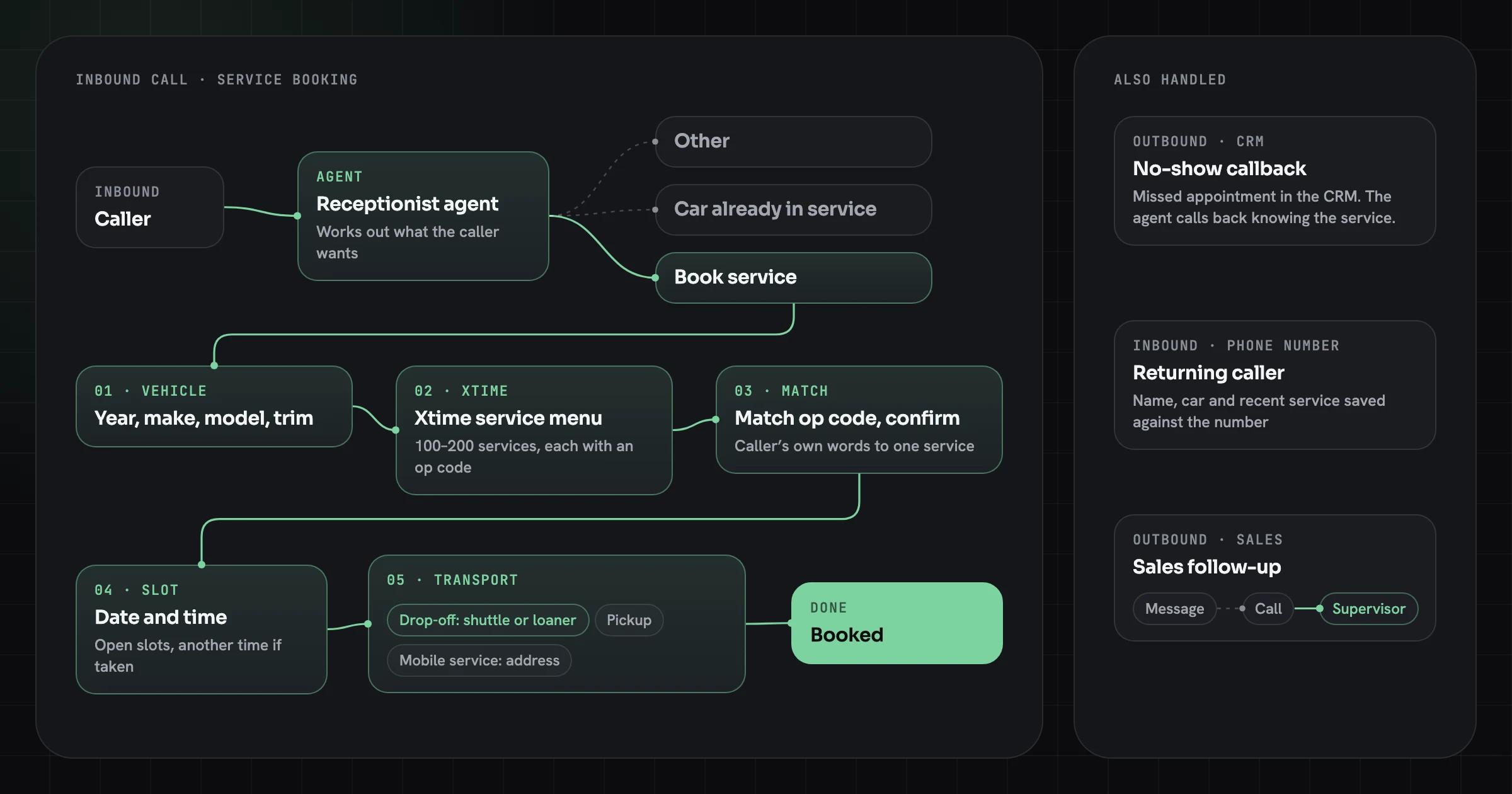
Mid-call lookups belong in the same budget: when a dealership booking agent loads a vehicle’s service menu or checks open slots during an Xtime API integration, each request is a tool call inside the caller’s turn, and the caller waits through it.
A latency budget, stage by stage
A one-second target only works if each stage has its own share of it, written down before the build. The table splits a turn into stages, with the published figure for each where one exists, checked October 18, 2026, and how to measure the rest.
| Stage | Published figure | What the figure covers | How to measure it on your calls |
|---|---|---|---|
| Phone network, each direction | 150 ms one-way target (ITU-T G.114) | Mouth-to-ear delay for most voice uses | Carrier and telephony timestamps on test calls |
| End-of-turn detection | 500 ms silence in OpenAI’s example VAD setting | An example configuration, not a default | Time from the caller’s last word to the turn-end event |
| Speech-to-text final | No comparable figure | Depends on model, audio and region | Turn-end event to final transcript |
| Language model | No comparable figure | Depends on model, prompt length and load | Transcript to first complete sentence |
| Tool calls | Your own APIs | Lookups in your systems | Request to response, per tool |
| Text-to-speech first audio | About 75 ms for ElevenLabs Flash v2.5 | Model only, excluding application and network latency | Sentence sent to first audio byte |
The table shows why the fixed parts matter. With the network at the G.114 limit in both directions and a 500 ms silence threshold, those two items alone take 800 ms (150 + 150 + 500), before transcription, the model or speech start. That is illustrative arithmetic, not a measurement, but it is why end-of-turn tuning and same-region hosting do more for latency than swapping models.


Why vendor latency numbers don’t add up
Vendor latency figures usually measure one model in isolation, while the caller hears the whole chain. ElevenLabs is explicit about this: its models page lists Flash v2.5 at about 75 ms and marks the figure as excluding application and network latency.
That is a fair way to describe a model, and it is the right comparison between models. It is not what a caller experiences. Add up model-only figures for speech-to-text, the language model and text-to-speech, and the sum still leaves out end-of-turn detection, the phone network, the hops between services and any tool call. Those are the stages that set the pause a caller hears.
When a vendor quotes a latency number, ask three questions: which stages it covers, whether it is a median or a 95th percentile, and whether it was measured on a phone call or in a browser.
End-of-turn detection is the hidden delay
The most overlooked delay is deciding when the caller has finished. A simple voice activity detector waits for a fixed stretch of silence before it ends the turn. OpenAI’s documentation for its realtime API describes the trade-off directly: with a shorter silence duration, turns are detected more quickly. Set it too short, and the agent interrupts people who pause mid-sentence; set it too long, and every reply starts late.
Newer approaches look at meaning as well as silence. LiveKit’s agent framework, for example, uses a turn detector model that predicts the end of a turn from both what was said and how it sounded, on top of voice activity detection, and can adapt its delay to the caller’s own pauses. OpenAI offers a semantic mode with an adjustable eagerness setting. Neither removes the trade-off, but both let the agent answer quickly when a sentence is clearly complete and wait when it is not.
What we measured: turn detection is most of the wait
We measured this ourselves in October 2026. A scripted caller (six turns booking a dental appointment) talked to OpenAI’s realtime API over a server WebSocket from a US cloud machine: 30 turns per model and setting, audio streamed at real-time pace, timed from the end of each caller clip to the first audio of the reply.
| Model and turn detection | Median wait | 90th percentile | Model, after the turn ended | |---|---|---|---| | gpt-realtime-2.1, semantic (default) | 4.5 s | 4.9 s | 0.71 s | | gpt-realtime-2.1, semantic, eagerness high | 2.6 s | 3.2 s | 0.72 s | | gpt-realtime-2.1, 500 ms silence | 1.0 s | 1.3 s | 0.65 s | | gpt-realtime-2.1-mini, semantic (default) | 4.5 s | 4.8 s | 0.58 s | | gpt-realtime-2.1-mini, 500 ms silence | 0.9 s | 1.1 s | 0.58 s |
Our caller clips ended about 0.35 s after the last spoken word, so add that much to get the wait from the caller’s last word. The model itself answered in about 0.6 to 0.7 s in every setting. The difference is the turn detector: in its default mode it waited around 4 seconds before deciding our caller had finished, while a plain 500 ms silence rule cut the whole wait to about one second. The trade-off from the previous section still applies, so test the faster setting with callers who pause mid-sentence.
At list prices the two models cost about $0.078 and $0.023 per minute of talk in these runs, before telephony and hosting; our AI voice agent pricing tracker compares that with Vapi, Retell and other platforms. You can hear the 500 ms setup, and see your own reply times, in our live voice agent demo.
How to cut latency without making the agent worse
We stream every stage, start speaking before the full response is generated, and run tool calls in parallel with filler acknowledgements — so the agent feels present even while it works.
That comes down to six choices:
- Stream transcription, generation and speech, so each stage starts on partial output instead of waiting for the previous one to finish.
- Send the first sentence to speech synthesis as soon as it is complete, and keep generating the rest while it plays.
- Keep the speech, model and telephony services in the same region, and keep connections warm between calls.
- Keep the system prompt short and move rarely needed instructions into tools, so the model reads less on every turn.
- Use a smaller, faster model for routing and simple turns, and a larger one only where reasoning is needed.
- Cache data that does not change during a call, such as opening hours or the caller’s account, after the first lookup.
None of these require a worse answer. The goal is to remove waiting, not thinking.
Interruptions matter as much as speed
A fast agent that cannot be interrupted still feels robotic. When a caller starts talking, the agent should stop speaking almost at once, keep what it heard, and respond to the interruption rather than finishing its script. Frameworks such as LiveKit pause agent speech when they detect the caller and can tell a real interruption from a backchannel like “uh-huh”, so the agent does not stop every time someone agrees with it.
Test this on purpose. Interrupt the agent mid-sentence, talk over it in a noisy room, and pause halfway through a long account number. These are the moments callers remember.
Latency targets by call type
Not every call needs the same speed, and the right target depends on what the caller is trying to do. A booking or FAQ call is made of short, scripted turns where speed is most of the experience. A discovery or sales call has longer answers where quality matters more than shaving a few hundred milliseconds.
- Booking, FAQs and routing. Short questions and short answers. Aim for the fastest turns you can measure, a small fast model for most turns, and cached data such as opening hours.
- Account lookups and changes. The tool call dominates. Acknowledge at once (“Let me check that”), run the lookup in parallel, and set a budget per tool.
- Discovery, sales and support with judgment. Longer reasoning is acceptable if the agent signals it is thinking. Keep the first sentence fast and let the rest follow.
- Regulated calls, such as healthcare scheduling. A disclosure or confirmation step adds a turn by design; budget for it instead of cutting it. Our healthcare software development page covers the privacy side of those calls.
- CallerCan I move my appointment to Friday?
- AI agentLet me check that.
- AI agentFriday has 10 am or 2 pm open. Which works better?
- Caller2 pm, please.
Whatever the type, measure the same way and report the median and the 95th percentile separately for each call flow.
Platform or custom pipeline: who controls the latency?
Hosted voice platforms such as Vapi and Retell assemble the pipeline for you: telephony, transcription, model and voice behind one API. That is the fastest way to a working agent, and for many call flows their latency is good enough. The trade-off is control. You choose from the vendors and regions the platform supports, and when a turn is slow, you can see less of why.
A custom pipeline, built on frameworks such as LiveKit or Pipecat, puts every stage under your control: where each service runs, which models handle which turns, how end-of-turn detection is tuned, and how tool calls are scheduled. It takes more engineering and more operational work. It is worth it when calls involve heavy lookups in your own systems, when data must stay in a specific region, or when volume makes per-minute platform fees a large line item. Same-region hosting does double duty there: it cuts a network hop on every turn and it is also how an agent keeps EU callers’ data in an EU region when a client asks for it; the transfer rules are explained in EU AI Act and GDPR rules for AI agents. The per-minute side of the decision is worked through in AI voice agent cost. Whichever route you take, measure it the same way.
- Fastest way to a working agent
- Vendors and regions the platform supports
- Less visibility into why a turn is slow
- More engineering and operational work
- You choose where each service runs
- Every stage under your control
How to measure voice agent latency
Measure what the caller hears, not what a dashboard reports. The number that matters is the time from the end of the caller’s speech to the first audio of the reply, recorded on a real phone call.
- Place test calls over the phone network, not only in a browser demo, because the carrier and telephony hops add delay a demo never sees.
- Record both sides of the call and mark the end of caller speech and the start of agent audio.
- Report the median and the 95th percentile across many turns; a good median with a slow tail still produces awkward calls.
- Log each stage separately, so a slow turn points to transcription, the model, a tool or speech synthesis.
- Repeat the test with background noise, accents and the longest tool calls in your flow.
Run this test on your own call flows before launch, because a latency figure measured on a different script, network or vendor mix says little about your calls.
“Latency isn’t a technical metric. It’s the difference between a conversation and a phone tree.”
What to do next
If you are planning a voice agent, set a latency target alongside your business goals, and ask any vendor or platform how they measured theirs. Our AI voice agent development work starts with your call flows, integrations and a latency budget for each one. To put a value on every answered call, read what missed calls really cost or put your own call volume into the AI voice agent ROI calculator.
Sources
- Timing in turn-taking and its implications for processing models of language, Frontiers in Psychology (Levinson & Torreira, 2015)
- Universals and cultural variation in turn-taking in conversation, PNAS (Stivers et al., 2009)
- What is latency? (ITU-T G.114 one-way delay target), Twilio
- Turn detection and interruptions, LiveKit Agents docs
- Voice activity detection (VAD), OpenAI API docs
- Models, ElevenLabs docs
- API pricing (realtime and audio models), OpenAI
